Internet, Thunderstorms, and Surge Protectors
Back in August and September of this year we had a series of thunderstorms here in North Carolina that knocked out power multiple times at our apartment.
Our cable modem and router had been plugged directly into the wall for nearly a year, ever since we moved in. I had intended to move them over to a surge protector, but had not gotten around to it. Having lived in NC for 16 years and also having previously repaired a Samsung SyncMaster 940MW that had surge damage under similar conditions (5 blown capacitors), I should have known better but I digress…
In September we had a particularly bad thunderstorm with some very close lighting strikes nearby. After a very loud thunderclap I heard a faint “pop” from the 8-port switch on my desk, and the internet went out. Definitely not what you want to hear during a thunderstorm. I checked my ISP’s app (Spectrum) on my phone and it was reporting an outage in the area, so I didn’t think too much about the internet being down. Usually outages are resolved fairly quickly.
12 hours later the internet was still down and the outage notice was gone. By then it was early in the morning, so I waited to check again in a few hours. Later that morning when I checked the app again it showed a new outage, so I was hopeful that it was related. The resolution time came and went, and the second outage alert went away yet still we had no internet. Doing some quick troubleshooting the device was powered but wouldn’t connect to the network. Spectrum offered to set an appointment to have a tech come out and replace it sometime the next week, but as our household is working from home at the moment this time frame was way too long. My roommate drove over to the local Spectrum office with the damaged modem to get a replacement. He said the employee simply handed him a new one and everything was fine. (yeah right, too easy)
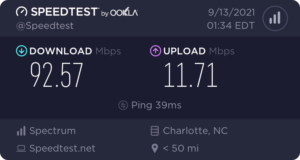
Download 92.57Mbps, Upload 11.71Mbps
Of course plug & play was too good to be true. Unfortunately Spectrum’s equipment is locked down and provide no local access for configuration, everything has to be done through their very limited mobile app. I got the device up and running, and for the time being we had internet and could work. Throughout the day I noticed it wasn’t super stable, and after some testing found that if the connection exceeded 100Mbps the connection would die. Latency through the roof and connection timeouts. If I kept the speeds limited to 100Mbps or below it was relatively stable.
I spent a while troubleshooting connections between different devices, discovered the “pop” that came from my switch was one of the ports frying. This switch was on a surge protector, and amazingly only the one port that got hit by the surge was damaged. So now I had a 7-port switch. Amazingly the ASUS AC1700 on the other end seemed to be fine, as none of the Ethernet ports had taken any surge damage. Throughout the day however, we noticed inconsistent results between WiFi & Ethernet, and frequent connection issues. Figuring the router had in fact taken some form of damage, I ordered an ASUS AC1900 as a replacement. I would have simply ordered the same model we already had as it was half the cost of the 1900, however the earliest shipping date was 1-2 weeks away and I wasn’t prepared to wait that long. I was able to overnight the 1900, so I went with that instead.
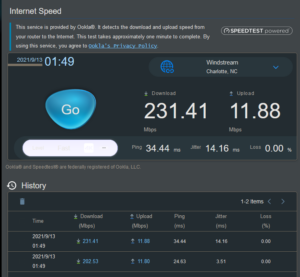
Speed tests from the ASUS AC1900
Swapping from the 1700 to the 1900 helped somewhat, but didn’t return us back to full speed. We went from 90-100Mbps unstable to 200-230Mbps stable.
I’m using a 100ft Ethernet cable, so to eliminate any other possibilities I hooked one end into my PC and the other directly into the modem, bypassing the switch and the router. For some reason, with Spectrum you have to reboot your PC after you do this or you can’t get online. Annoying, but whatever. Running speed tests directly connected to the modem showed the same results. Instead of our normal 480Mbps down and 23Mbps up that we were paying for, we were getting roughly 200Mbps down and 12Mbps up.
After doing some research and discussing the issue with a friend, we concluded that the most likely cause for the speeds we were seeing on the modem was a provisioning issue. I called Spectrum and spent about 20 minutes on the phone with several reps, and the final rep confirmed that the device had not been provisioned for the account. Fun. With tech #2’s help we started to correctly provision the replacement modem.
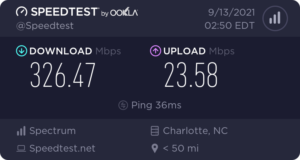
Download 326.47Mbps Upload 23.58Mbps
Not bad, but not quite where it should be. 6 minutes later, gained another ~80Mbps. We discussed for a bit, and concluded that it may just be still setting up and take a few minutes to settle.
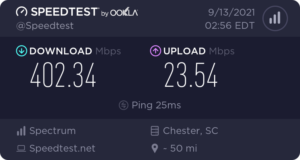
Download 402.34Mbps Upload 23.54Mbps
We discussed it looked acceptable and would keep an eye on it. Then I tried to put my equipment back where it was supposed to be, with the modem connected to the router providing internet to the entire apartment (instead of just my PC). Remember, when the device connected to the modem changes, you have to reboot to re-establish connection. That’s when things went backwards. After rebooting the modem and the router, we were down to maximum around 130Mbps down.
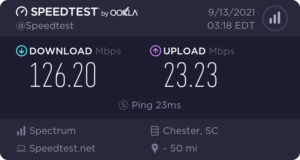
Download 126.20Mbps Upload 23.23Mbps
At this point I was done with going back and forth with Spectrum. I same-day shipped an NETGEAR 8-Port switch. After following a quick guide provided by ARRIS with the modem, I was able to provision the new modem myself using a BYOD page on Spectrum’s website and within a few minutes we were back up to full speed. This ended up being an expensive reminder of why surge protectors are important for protecting computers and networking equipment.
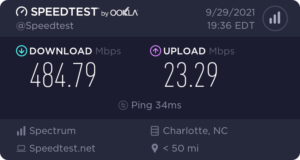
Download 484.79Mbps Upload 23.29Mbps
Filed under: Life - @ November 8, 2021 21:46